
🗺️
❓
2014
2017
2020
2021
2022-2023
2024
2025
🧬
📆
1
2
3
📊
Formula = Early Access + Consistency + Diversity + Security
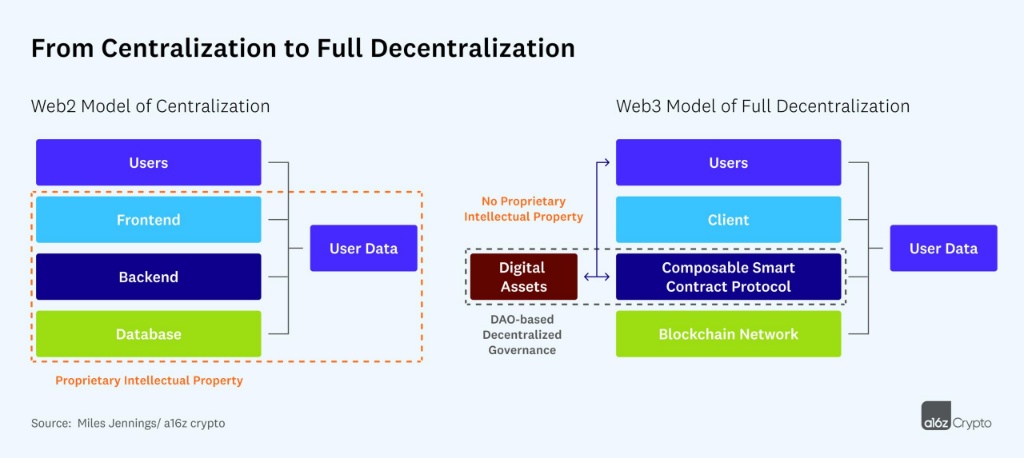
🌍
| Web1 | Read Only | |
| Web2 | Read & Write | |
| Web3 | Read, Write, Own |
🔑
⚙️
1
2
3
🚀
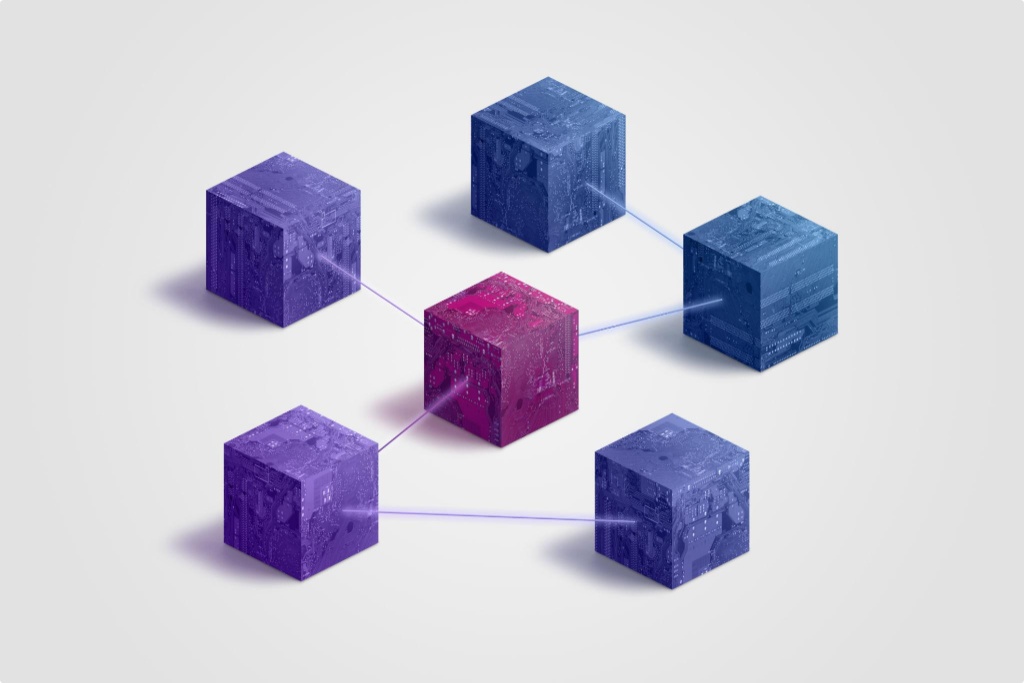
⚙️
1
2
3
🌐
🚀
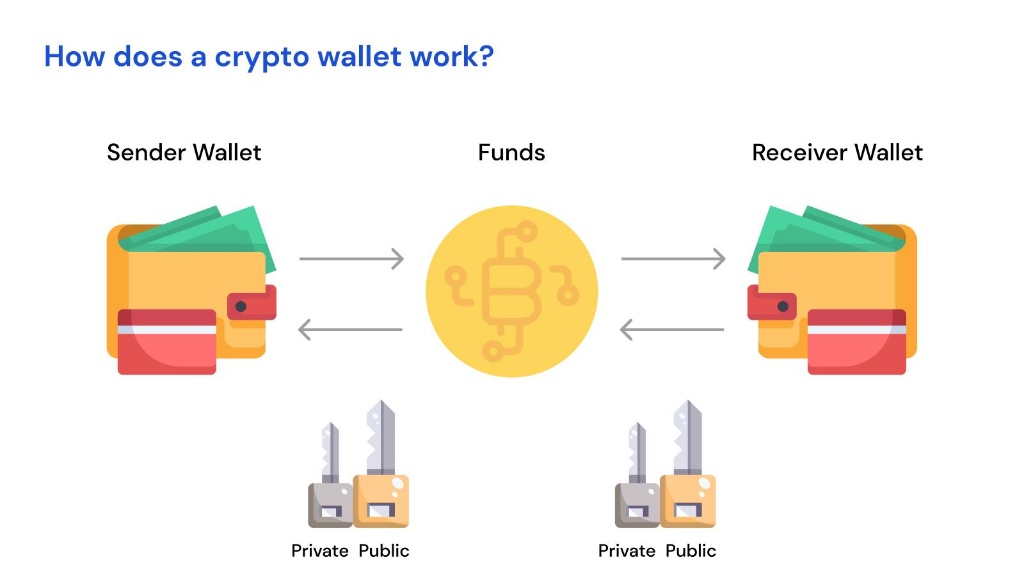
🔑
⚙️
1
2
3
🔄
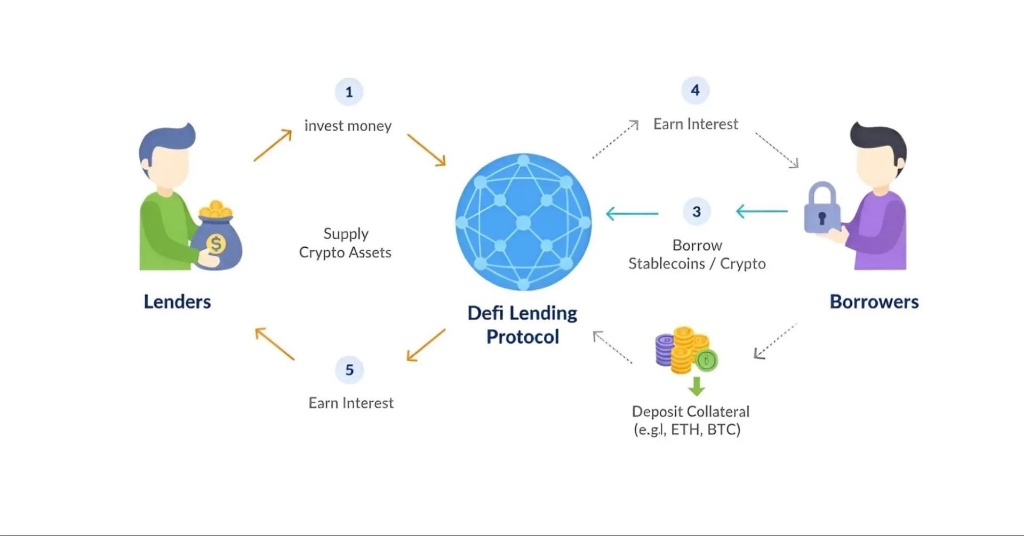
🔥
📦
⚙️
1
2
3

⚡
1
2
3
🏦
A
B
C
📊
| DEX ⚡ | CEX 🏦 | |
|---|---|---|
⚖️
🔒
🌾
1
2
3
⚙️
1
2
3
🔥
🚀

🪙
⚙️
1
2
3
🚀
🏛️
🔄
1
2
3
🚀
🔑
1
2
3
4
📊
| ✅ Good Tokenomics | ❌ Bad Tokenomics | |
|---|---|---|
🧠
🔥
📊
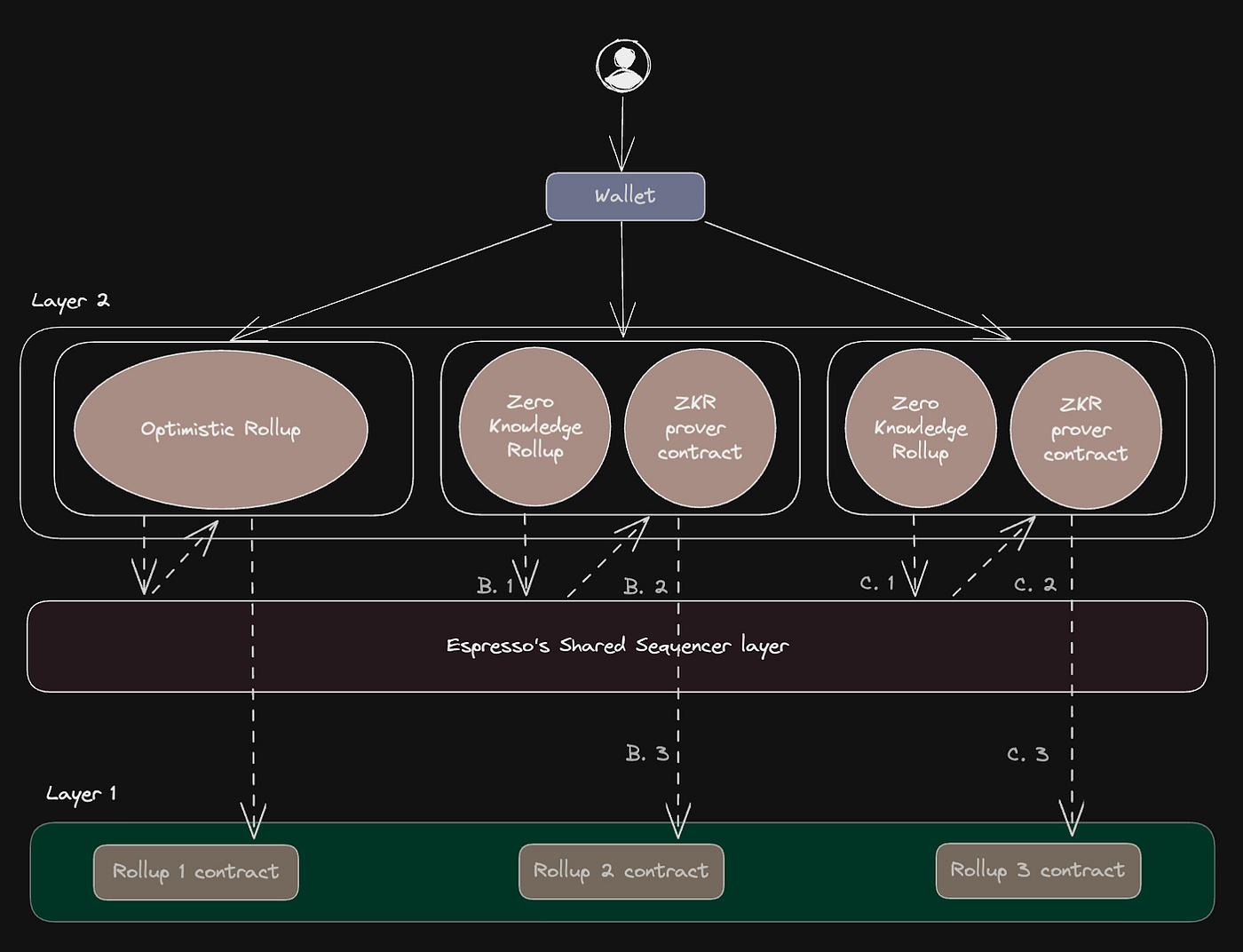
| Optimistic | ZK Rollups | |
|---|---|---|
🚀
⚙️
1
2
3
📦
🚀
🧠
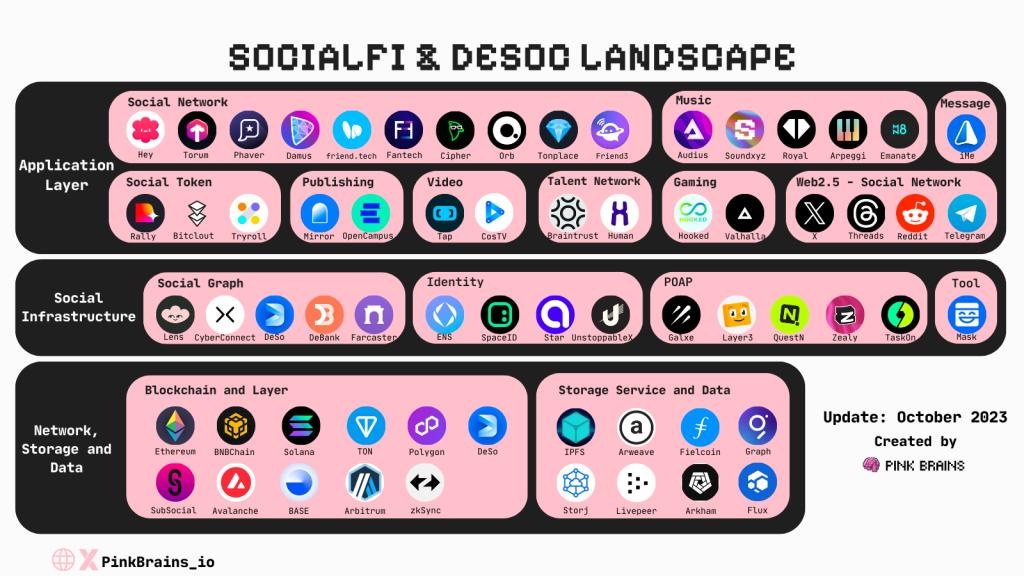
| Web2 (IG, X, TikTok) | SocialFi / Web3 Social | |
|---|---|---|
🔥
🚀
🌉
1
2
3
🔮
1
2
3

🔥
🚀
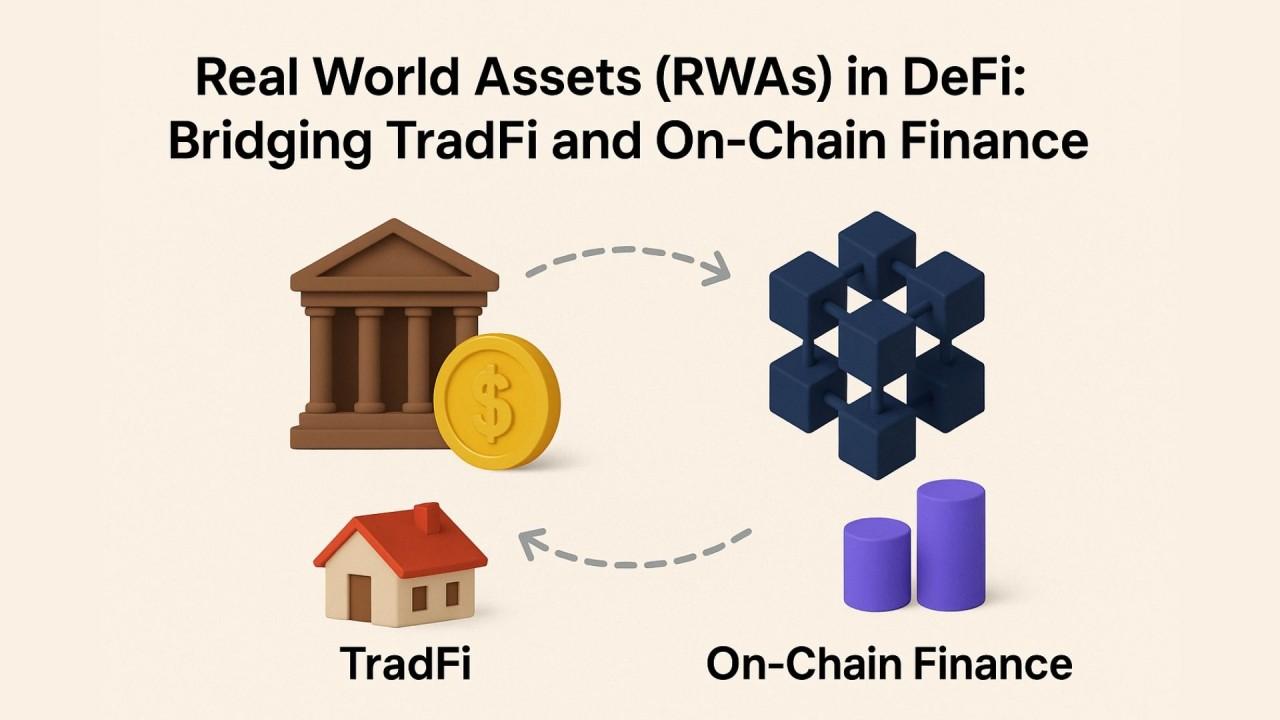
⚙️
1
2
3
🚀
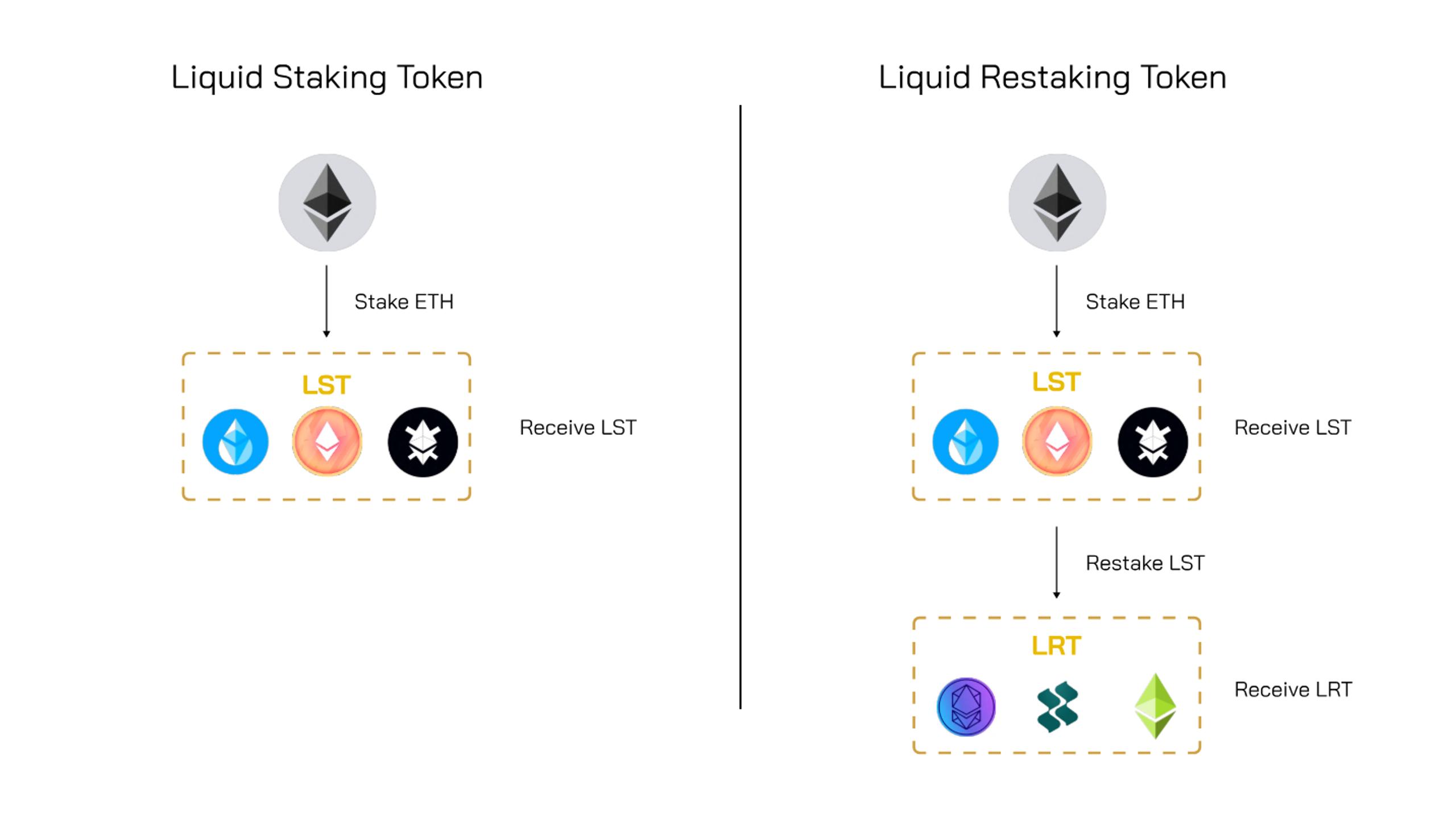
💧
⚙️
1
2
3
4
🚀
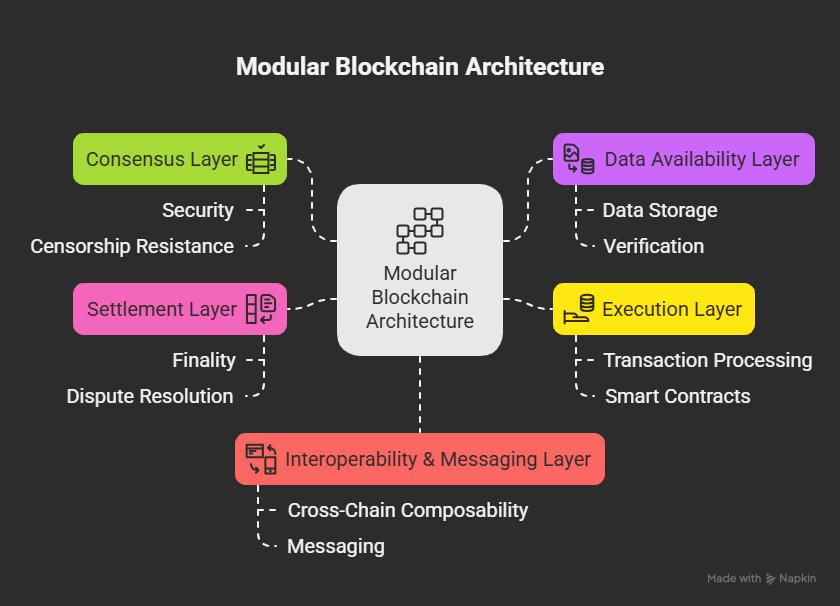
🧩
✨
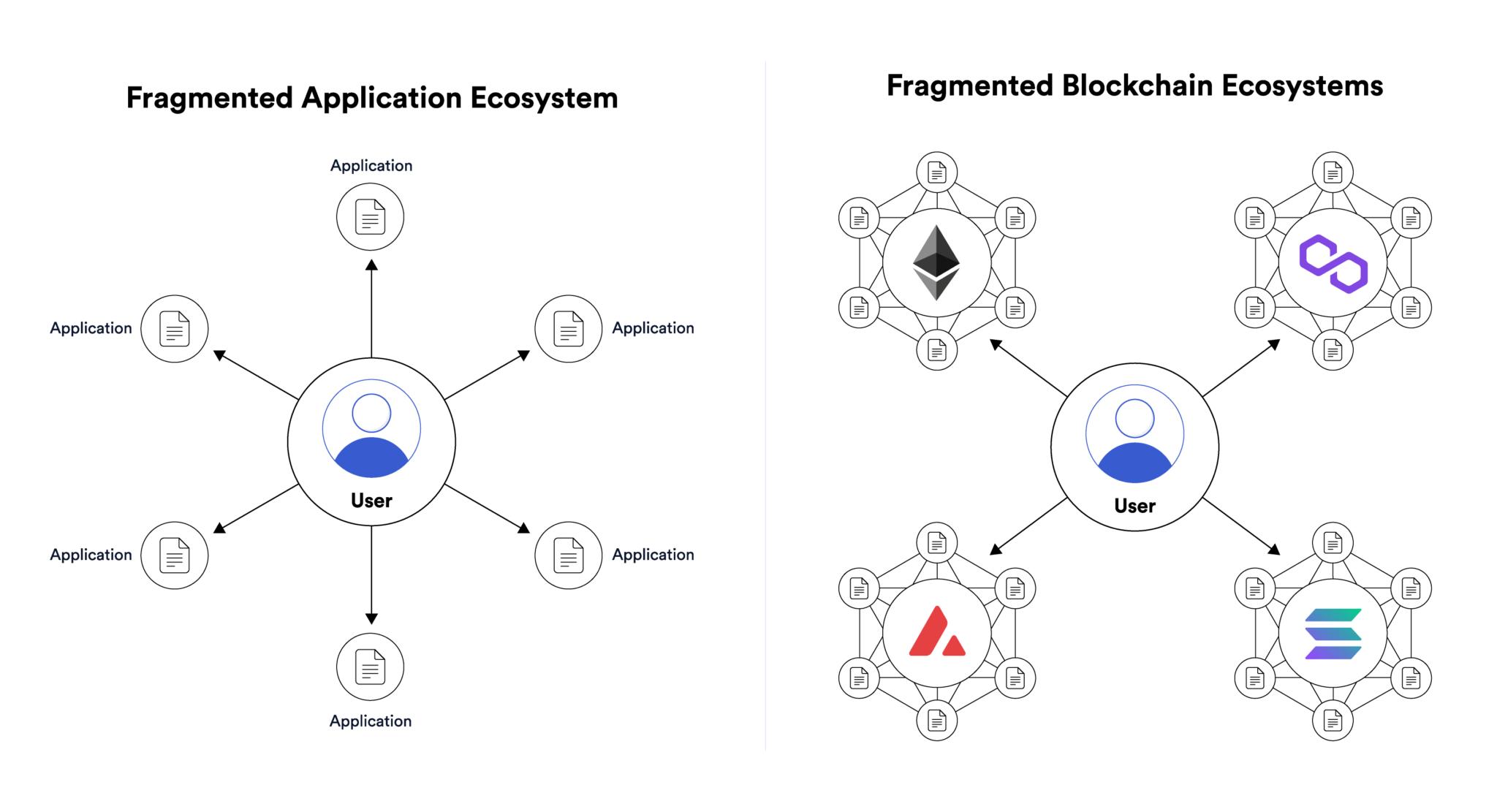
⚙️
1
2
3
✨
👛
1
2
3
🔐
🎭
🎭
🚩
⚙️
1
2
3
💰
🌍
| 🇮🇩 Indonesia | ||
| 🇸🇬 Singapore | ||
| 🇺🇸 USA | ||
| 🇦🇪 Dubai |
🧠
🚀
1
2
3
🧬
🧊
1
2
3
📊
⚡
Airdrop = Early Access + Consistency + Non-Sybil + Narrative Awareness
🤖
ChatGPT (OpenAI)
Claude (Anthropic)
Gemini (Google)
Perplexity AI
Grok (xAI)
DeepSeek
⚡
1
2
3
4
🛠️
Midjourney / DALL-E
ElevenLabs
Julius AI
GitHub Copilot
🐍
# Install library web3
pip install web3
# Contoh cek balance ETH
from web3 import Web3
w3 = Web3(Web3.HTTPProvider('https://mainnet.infura.io/v3/YOUR_KEY'))
balance = w3.eth.get_balance('0xYOUR_ADDRESS')
print(w3.from_wei(balance, 'ether'))
pip install web3
# Contoh cek balance ETH
from web3 import Web3
w3 = Web3(Web3.HTTPProvider('https://mainnet.infura.io/v3/YOUR_KEY'))
balance = w3.eth.get_balance('0xYOUR_ADDRESS')
print(w3.from_wei(balance, 'ether'))
🟨
// Cek balance dengan ethers.js
import { ethers } from 'ethers';
const provider = new ethers.JsonRpcProvider('https://mainnet.infura.io/v3/KEY');
const balance = await provider.getBalance('0xYOUR_ADDRESS');
console.log(ethers.formatEther(balance), 'ETH');
import { ethers } from 'ethers';
const provider = new ethers.JsonRpcProvider('https://mainnet.infura.io/v3/KEY');
const balance = await provider.getBalance('0xYOUR_ADDRESS');
console.log(ethers.formatEther(balance), 'ETH');
🔷
// SPDX-License-Identifier: MIT
pragma solidity ^0.8.20;
contract SimpleToken {
string public name = "MyToken";
mapping(address => uint256) public balanceOf;
function transfer(address to, uint256 amount) public {
balanceOf[msg.sender] -= amount;
balanceOf[to] += amount;
}
}
pragma solidity ^0.8.20;
contract SimpleToken {
string public name = "MyToken";
mapping(address => uint256) public balanceOf;
function transfer(address to, uint256 amount) public {
balanceOf[msg.sender] -= amount;
balanceOf[to] += amount;
}
}
🦀
Rust
Go (Golang)
Bash / Shell Script
Move (Aptos/Sui)
🏪
DigitalOcean
Vultr
Contabo
AWS / GCP / Azure
🚀
1
2
3
4
💻
# Konek ke VPS
ssh root@IP_VPS_KAMU
# Update sistem Ubuntu
apt update && apt upgrade -y
# Jalankan script di background (tetap jalan saat SSH tutup)
screen -S nama_session
# ... jalankan program kamu di sini ...
# Ctrl+A lalu D untuk detach (keluar tanpa stop)
# Kembali ke session yang berjalan
screen -r nama_session
# Lihat semua session aktif
screen -ls
ssh root@IP_VPS_KAMU
# Update sistem Ubuntu
apt update && apt upgrade -y
# Jalankan script di background (tetap jalan saat SSH tutup)
screen -S nama_session
# ... jalankan program kamu di sini ...
# Ctrl+A lalu D untuk detach (keluar tanpa stop)
# Kembali ke session yang berjalan
screen -r nama_session
# Lihat semua session aktif
screen -ls
🔒
📁
pwd # Tampilkan direktori saat ini
ls # List file di folder
ls -la # List lengkap + file tersembunyi
cd /path # Pindah ke direktori
cd .. # Naik satu level ke atas
cd ~ # Ke home directory
mkdir nama # Buat folder baru
rm -rf nama # Hapus folder (⚠️ hati-hati, permanen)
ls # List file di folder
ls -la # List lengkap + file tersembunyi
cd /path # Pindah ke direktori
cd .. # Naik satu level ke atas
cd ~ # Ke home directory
mkdir nama # Buat folder baru
rm -rf nama # Hapus folder (⚠️ hati-hati, permanen)
📄
cat file.txt # Tampilkan isi file
nano file.txt # Edit file (text editor sederhana)
cp source dest # Copy file
mv source dest # Pindah/rename file
chmod +x script.sh # Beri izin eksekusi ke script
chown user:group file # Ganti kepemilikan file
nano file.txt # Edit file (text editor sederhana)
cp source dest # Copy file
mv source dest # Pindah/rename file
chmod +x script.sh # Beri izin eksekusi ke script
chown user:group file # Ganti kepemilikan file
⚙️
ps aux # Lihat semua proses berjalan
top / htop # Monitor CPU & RAM real-time
kill PID # Hentikan proses by ID
pkill nama_proses # Hentikan proses by nama
nohup cmd & # Jalankan di background
jobs # Lihat background jobs
top / htop # Monitor CPU & RAM real-time
kill PID # Hentikan proses by ID
pkill nama_proses # Hentikan proses by nama
nohup cmd & # Jalankan di background
jobs # Lihat background jobs
🌐
curl https://url.com # HTTP request
wget https://url.com/file # Download file
ping google.com # Test koneksi
netstat -tulpn # Lihat port yang terbuka
ufw status # Status firewall
ufw allow 8080 # Buka port 8080
wget https://url.com/file # Download file
ping google.com # Test koneksi
netstat -tulpn # Lihat port yang terbuka
ufw status # Status firewall
ufw allow 8080 # Buka port 8080
⏰
crontab -e # Buka cron editor
# Format: menit jam hari bulan hari_minggu perintah
0 * * * * /usr/bin/python3 /home/bot/script.py # Setiap jam
0 0 * * * /bin/bash /home/backup.sh # Setiap tengah malam
*/5 * * * * curl https://api.example.com/ping # Setiap 5 menit
# Format: menit jam hari bulan hari_minggu perintah
0 * * * * /usr/bin/python3 /home/bot/script.py # Setiap jam
0 0 * * * /bin/bash /home/backup.sh # Setiap tengah malam
*/5 * * * * curl https://api.example.com/ping # Setiap 5 menit
⚙️
# Install Git (Ubuntu)
apt install git
# Konfigurasi identitas (wajib sekali)
git config --global user.name "Nama Kamu"
git config --global user.email "email@kamu.com"
apt install git
# Konfigurasi identitas (wajib sekali)
git config --global user.name "Nama Kamu"
git config --global user.email "email@kamu.com"
📋
# Clone repo dari GitHub ke VPS/laptop
git clone https://github.com/user/repo.git
# Lihat status perubahan
git status
# Stage perubahan
git add . # Semua file
git add file.txt # File spesifik
# Commit (simpan snapshot)
git commit -m "Pesan perubahan kamu"
# Push ke GitHub
git push origin main
# Pull update terbaru dari GitHub
git pull origin main
git clone https://github.com/user/repo.git
# Lihat status perubahan
git status
# Stage perubahan
git add . # Semua file
git add file.txt # File spesifik
# Commit (simpan snapshot)
git commit -m "Pesan perubahan kamu"
# Push ke GitHub
git push origin main
# Pull update terbaru dari GitHub
git pull origin main
🌿
git branch # Lihat semua branch
git checkout -b fitur-baru # Buat & pindah ke branch baru
git checkout main # Kembali ke branch main
git merge fitur-baru # Gabung branch ke main
git branch -d fitur-baru # Hapus branch
git checkout -b fitur-baru # Buat & pindah ke branch baru
git checkout main # Kembali ke branch main
git merge fitur-baru # Gabung branch ke main
git branch -d fitur-baru # Hapus branch
🔑
GitHub Actions
GitHub Secrets
⚙️
# Install via NVM (Node Version Manager) — direkomendasikan
curl -o- https://raw.githubusercontent.com/nvm-sh/nvm/v0.39.7/install.sh | bash
source ~/.bashrc
# Install Node.js versi terbaru LTS
nvm install --lts
nvm use --lts
# Verifikasi instalasi
node --version
npm --version
curl -o- https://raw.githubusercontent.com/nvm-sh/nvm/v0.39.7/install.sh | bash
source ~/.bashrc
# Install Node.js versi terbaru LTS
nvm install --lts
nvm use --lts
# Verifikasi instalasi
node --version
npm --version
📦
# Inisialisasi project baru
npm init -y
# Install package
npm install ethers # Install ethers.js
npm install -g pm2 # Install global (pm2 process manager)
# Jalankan script
node index.js
npm run start # Jalankan script dari package.json
# Lihat semua package terinstall
npm list
npm init -y
# Install package
npm install ethers # Install ethers.js
npm install -g pm2 # Install global (pm2 process manager)
# Jalankan script
node index.js
npm run start # Jalankan script dari package.json
# Lihat semua package terinstall
npm list
🔄
npm install -g pm2
pm2 start index.js --name "bot-saya" # Jalankan bot
pm2 list # Lihat semua proses
pm2 logs bot-saya # Lihat log real-time
pm2 restart bot-saya # Restart bot
pm2 stop bot-saya # Stop bot
pm2 startup # Auto-start saat VPS reboot
pm2 save # Simpan konfigurasi
pm2 start index.js --name "bot-saya" # Jalankan bot
pm2 list # Lihat semua proses
pm2 logs bot-saya # Lihat log real-time
pm2 restart bot-saya # Restart bot
pm2 stop bot-saya # Stop bot
pm2 startup # Auto-start saat VPS reboot
pm2 save # Simpan konfigurasi
⚙️
# Install Docker
curl -fsSL https://get.docker.com -o get-docker.sh
sh get-docker.sh
# Jalankan Docker tanpa sudo (opsional)
usermod -aG docker $USER
newgrp docker
# Verifikasi
docker --version
curl -fsSL https://get.docker.com -o get-docker.sh
sh get-docker.sh
# Jalankan Docker tanpa sudo (opsional)
usermod -aG docker $USER
newgrp docker
# Verifikasi
docker --version
📋
# Pull image dari Docker Hub
docker pull node:20
# Jalankan container
docker run -d --name bot-saya node:20 node /app/index.js
# Lihat container berjalan
docker ps
# Lihat log container
docker logs bot-saya
# Stop & hapus container
docker stop bot-saya && docker rm bot-saya
# Lihat semua image tersimpan
docker images
docker pull node:20
# Jalankan container
docker run -d --name bot-saya node:20 node /app/index.js
# Lihat container berjalan
docker ps
# Lihat log container
docker logs bot-saya
# Stop & hapus container
docker stop bot-saya && docker rm bot-saya
# Lihat semua image tersimpan
docker images
📄
# Contoh Dockerfile untuk bot Node.js
FROM node:20-alpine
WORKDIR /app
COPY package*.json ./
RUN npm install
COPY . .
CMD ["node", "index.js"]
# Build image
docker build -t bot-saya .
# Jalankan image
docker run -d --name bot bot-saya
FROM node:20-alpine
WORKDIR /app
COPY package*.json ./
RUN npm install
COPY . .
CMD ["node", "index.js"]
# Build image
docker build -t bot-saya .
# Jalankan image
docker run -d --name bot bot-saya
🎼
# docker-compose.yml
version: '3.8'
services:
bot:
build: .
restart: always
env_file: .env
db:
image: postgres:15
environment:
POSTGRES_PASSWORD: secret
# Jalankan semua service
docker compose up -d
version: '3.8'
services:
bot:
build: .
restart: always
env_file: .env
db:
image: postgres:15
environment:
POSTGRES_PASSWORD: secret
# Jalankan semua service
docker compose up -d
🐘
-- Buat tabel
CREATE TABLE airdrops (
id SERIAL PRIMARY KEY,
name TEXT NOT NULL,
status TEXT DEFAULT 'active',
created_at TIMESTAMP DEFAULT NOW()
);
-- Insert data
INSERT INTO airdrops (name, status) VALUES ('LayerZero', 'active');
-- Query data
SELECT * FROM airdrops WHERE status = 'active' ORDER BY created_at DESC;
-- Update data
UPDATE airdrops SET status = 'listed' WHERE name = 'LayerZero';
-- Hapus data
DELETE FROM airdrops WHERE id = 1;
CREATE TABLE airdrops (
id SERIAL PRIMARY KEY,
name TEXT NOT NULL,
status TEXT DEFAULT 'active',
created_at TIMESTAMP DEFAULT NOW()
);
-- Insert data
INSERT INTO airdrops (name, status) VALUES ('LayerZero', 'active');
-- Query data
SELECT * FROM airdrops WHERE status = 'active' ORDER BY created_at DESC;
-- Update data
UPDATE airdrops SET status = 'listed' WHERE name = 'LayerZero';
-- Hapus data
DELETE FROM airdrops WHERE id = 1;
🍃
MongoDB
Redis
Supabase
Firebase
🔌
// Fetch harga ETH dari CoinGecko API (JavaScript)
const res = await fetch('https://api.coingecko.com/api/v3/simple/price?ids=ethereum&vs_currencies=usd');
const data = await res.json();
console.log('ETH Price: $' + data.ethereum.usd);
# Fetch balance dari Etherscan API (Python)
import requests
url = f'https://api.etherscan.io/api?module=account&action=balance&address=0xADDRESS&apikey=KEY'
r = requests.get(url).json()
print(int(r['result']) / 1e18, 'ETH')
const res = await fetch('https://api.coingecko.com/api/v3/simple/price?ids=ethereum&vs_currencies=usd');
const data = await res.json();
console.log('ETH Price: $' + data.ethereum.usd);
# Fetch balance dari Etherscan API (Python)
import requests
url = f'https://api.etherscan.io/api?module=account&action=balance&address=0xADDRESS&apikey=KEY'
r = requests.get(url).json()
print(int(r['result']) / 1e18, 'ETH')
🕷️
BeautifulSoup (Python)
Playwright / Puppeteer
Scrapy (Python)
Bright Data / Proxy
📱
# Python — Telegram Bot sederhana dengan python-telegram-bot
pip install python-telegram-bot
from telegram import Bot
import asyncio
async def kirim_alert():
bot = Bot(token="TOKEN_BOT_KAMU")
await bot.send_message(
chat_id="CHAT_ID_KAMU",
text="🚨 Alert: Airdrop baru terdeteksi!"
)
asyncio.run(kirim_alert())
pip install python-telegram-bot
from telegram import Bot
import asyncio
async def kirim_alert():
bot = Bot(token="TOKEN_BOT_KAMU")
await bot.send_message(
chat_id="CHAT_ID_KAMU",
text="🚨 Alert: Airdrop baru terdeteksi!"
)
asyncio.run(kirim_alert())
⛓️
// JavaScript — Auto claim reward dari contract
import { ethers } from 'ethers';
const provider = new ethers.JsonRpcProvider(RPC_URL);
const wallet = new ethers.Wallet(PRIVATE_KEY, provider);
const contract = new ethers.Contract(CONTRACT_ADDR, ABI, wallet);
// Claim reward
const tx = await contract.claimReward();
await tx.wait();
console.log('Claimed! TX:', tx.hash);
import { ethers } from 'ethers';
const provider = new ethers.JsonRpcProvider(RPC_URL);
const wallet = new ethers.Wallet(PRIVATE_KEY, provider);
const contract = new ethers.Contract(CONTRACT_ADDR, ABI, wallet);
// Claim reward
const tx = await contract.claimReward();
await tx.wait();
console.log('Claimed! TX:', tx.hash);